Hands-on Microformats
Denise R. Jacobs
PapillonEffect.com
Who is Denise?
Starting with teaching herself HTML in 1996 (and dreaming in it for a while), Denise R. Jacobs has worked at creating and maintaining websites, web application localization, web project management, and teaching web design/development since then.
Currently, Denise is a Web Solutions Consultant with her company PapillonEffect.com in Miami, Florida. She helps individuals and businesses increase their web knowledge, transform their web presence, and bring their websites into the 21st century with standards-based markup, web 2.0 tools, and the use of Social Media.
What are Microformats?
Microformats are small patterns of HTML to represent commonly published things like people, events, blog posts, reviews and tags in web pages.
Great. So what good does that do?
Microformats are a way of adding simple markup to human-readable data items such as events, contact details or locations, on web pages, so that the information in them can be extracted by software and indexed, searched for, saved, cross-referenced or combined.
In other words…
Microformats capitalize on the way people already work with and use the web, and add an additional layer of information that enhances functionality and use of the content on your pages.
Microformats are not
- a new language
- overly complex
- a whole new approach that throws away what already works today
The Basis of Microformats
Shhhhh! Here’s a secret:
- Microformats are based on clean, semantic (X)HTML (aka POSH). If you use this already, you are very close to using microformats, you won't have to do much additional work to implement them on your site.
- Microformats add information to a web page using mostly the class attribute (although sometimes the id, title, rel or rev attributes too). The class names are semantically rich and describe the data they encapsulate.
Source: http://microformats.org/wiki/implement
What can microformats do for you?
Why use Microformats?
- They provide consistency
- They provide contextual meaning beyond the standard set of XHTML elements.
Why were microformats developed?
- they are a logical next step in the evolution of web design and information architecture
- they are a way for people and organisations to publish richer information themselves, without having to rely upon centralized services
- they provide a way to use (X)HTML for data.
Source: http://presentations.lawver.net/standards/power_of_microformats/, http://microformats.org/wiki/introduction
Microformats currently supported
- hCalendar – Putting Event & Todo data on the web (iCalendar)
- hCard – electronic business card/self-identification (vCard
- rel-license – To declare licenses for content
- Example: <a rel="license" href="http://creativecommons.org/licenses/by-nc-sa/2.0/">
- rel-tag – Allow authors to assign keywords to stuff.
- Example: <a rel="tag" href="tagspace/tag">...</a>
- VoteLinks
- XFN Distributed Social Networks (“XHTML Friends Network “)
- Example: <a rel="friend met" href="http://molly.com">Molly Holzschlag</a>
- XOXO - eXtensible Open XHTML Outlines (you are looking at one!)
sources: http://theryanking.com/presentations/2005/webzine/, http://tantek.com/presentations/2006/03/what-are-microformats/, http://microformats.org/wiki/implement, http://theryanking.com/presentations/2006/www/, http://microformats.org/wiki/Main_Page
Microformats coming in the not-so-distant future
- adr - for marking up address information
- geo - for marking up geographic coordinates (latitude; longitude)
- hAtom - format to standardize feeds/syndicating episodic content (e.g. weblog postings)
- hAudio
- hProduct
- hRecipe
- hResume - for publishing resumes and CVs
Microformats coming in the not-so-distant future (contd)
- hReview -Publishing reviews of products, events, people, etc
- rel-directory - distributed directory building
- rel-enclosure - for indicating attachments (e.g. files) to download and cache
- rel-home - indicate a hyperlink to the homepage of the site
- rel-payment - indicate a payment mechanism
- xFolk
That’s all well and good, but nobody uses them, right?
Actually, some big names are using microformats:
- hCalendar – events: Yahoo Upcoming.org, Eventful.com, Wikipedia, more…
- hCard - people & orgs: Avon.com, Eventful.com, Flickr, Google, Wikipedia, mailchimp.com more…
- rel-license - license links: CC Creator, Yahoo CC search, Google Rights Search
- rel-tag - content tagging: Technorati, Ice Rocket, more
- VoteLinks - for/against/abstain a link: Technorati
- XOXO - lists and outlines: WordPress, Technorati, S5, more
- hListing - classifieds: Oodle, Edgeio, WordPress plugin
Sources: http://tantek.com/presentations/2006/03/what-are-microformats/, http://microformats.org/wiki/notable-users
More big names using microformats:
- hResume - resumes: SimplyHired
- hReview – reviews: JudysBook, Reevoo, more
- rel-directory - directory inclusion: Technorati
- Xfn – relationships: Wordpress, Flickr, Rubhub.com
- Geo: Wikipedia
- hReview: Yahoo, on several sites
Sources: http://tantek.com/presentations/2006/03/what-are-microformats/, http://microformats.org/wiki/notable-users
Hands-on: Something you may have done already
xfn on your blog 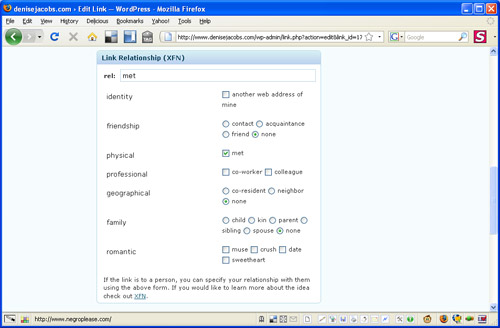
Hands-on: Something you can do tonight
Put an hcard on your website
vCard Example
BEGIN:VCARDN:Jacobs;Denise;;;FN:Denise JacobsEMAIL;type=INTERNET;type=WORK;denise@papilloneffect.comEND:VCARD
This is a simple version of a vCard, exported from Apple's Address book. Definitely machine readable only.
Hands-on: Something you can do tonight (cont'd)
hCard, the markup:
<div class="vcard"><span class="fn">Denise Jacobs </span><span class="email"><span class="type">work</span><a class="value" href="mailto:denise@papilloneffect.com">denise@papilloneffect.com</a></span></div>
This is a simple version of a vCard, exported from Apple's Address book. Definitely machine readable only.
Hands-on: Something you can do in upcoming months
Your personal website(s)/ blog(s)
- add hCard to your contact info page along with an "Add to address book" link
- add hCard+XFN to your friends list or blog roll
- add your website and contact page to the hcard-examples-in-wild page.
- add hAtom to your blog pages
Sources: http://microformats.org/wiki/what-are-microformats
Hands-on: Something you can do in upcoming months
Your company/organization’s website
- add hCard to the contact/about pages along with "Add to address book" links for each hCard.
- If your company has a page listing employees or others that belong to the organization, add hCard to the listings or search results.
- Use hCalendar anywhere on the website that publishes event information.
- If your organization publishes its history, mark up the events noted with hCalendar, thus allowing anybody to build a dynamic timeline application with your history.
- Any publication of information about people, events, reviews etc. could benefit from being marked up with hCard, hCalendar, and hReview respectively.
Sources: http://microformats.org/wiki/what-are-microformats
Don't wait! Get in on the trend.
"...Do you just use your browser to browse? That's so 20th century." -- Mark Pilgrim
Questions?
Anyone? Anyone?
You can always contact me later if you need to: denise (at) denisejacobs (dot) com
Or follow me on Twitter: @denisejacobs
Resources & Acknowledgements
- Michael Montgomery's Refresh presentation, October 2008: http://www.webstandardsforskeptics.com/microformats_29oct08.html
- Microformats.org: http://microformats.org/get-started/, http://microformats.org/wiki/Main_Page
- Kevin Lawver’s presentation: http://presentations.lawver.net/standards/power_of_microformats/
- Tantek Celik’s presentation: http://tantek.com/presentations/2006/03/what-are-microformats/
- Ryan King’s presentations: , http://theryanking.com/presentations/2006/www/
- Great overview article:http://www.smashingmagazine.com/2007/05/04/microformats-what-they-are-and-how-to-use-them/,
- Microformat-generating tools: http://microformats.org/code-tools/